DLsite Purchase Missing? Find Your Works, Fix Purchase History and PlayDRM Errors (2026)
Bought something on DLsite but can't find it? Official fixes for purchases missing from Purchase History, DLsite Play, or DLsite Nest (wrong account, pending payment, filters, hidden works), how to re-download, and what PlayDRM error codes (1001–1008, 2003, 2004) mean.
Also available in: 한국어
Affiliate disclosure
This article contains affiliate links to DLsite. Details are accurate as of the update date above; check the official site for the latest information.
Quick answer
- DLsite's viviON ID help says purchase histories have "almost never" actually vanished. Usually you are logged into a different account.
- Purchase History shows the current month by default. Pick the month and section, then press Display.
- Works hidden in DLsite Play stay in Settings → Hidden Product List. Resetting DLsite Play settings does not delete purchases.
- Convenience store, net banking, and e-money payments can take about 5 to 30 minutes to appear. Paidy and atone orders appear only once confirmed.
- PlayDRM needs the 16-character license key from the download page, an internet connection the first time, and the correct .exe (startup.exe when there is one).
This week's picks · Updated every FridayDLsite Weekly Picks (Nov 13–19, 2026): 5 English-Ready Works Trending This Week
Contents
- Find the cause in 30 seconds
- Missing purchases: cause and fix
- Cause 1: You’re logged into a different account
- Cause 2: The payment hasn’t finished
- Cause 3: The Purchase History filter is hiding it
- Cause 4: It’s hidden or not synced in DLsite Play or Nest
- Cause 5: Guest purchases and translated versions
- Found it? How to re-download
- PlayDRM and license key errors
- What PlayDRM is
- PlayDRM error codes
- Other PlayDRM problems
- Summary
- Sources (checked November 14, 2026)
If a DLsite purchase seems to be gone, check which account you’re in first. The viviON ID help (DLsite’s account help) says that among customers who contacted it, “it has almost never been the case that their purchase history had actually vanished.” The rest is usually a pending payment, a filter, or a work hidden in DLsite Play. Further down: how to re-download, and how to fix PlayDRM license key errors. Facts are from DLsite’s official help center, checked on November 14, 2026.
Quick answer
- Purchase History is empty
- Depends You are probably logged into another account (social login, old ID, NijiGAME)
- Just paid at a convenience store, by net banking, or e-money
- Wait about 5 to 30 minutes
- Only this month shows
- Yes That's the default. Choose the month and section, then press Display
- Missing from DLsite Play only
- Yes Sync Library, check the Hidden Product List, clear cache and cookies
- Can you re-download?
- Yes Yes, as many times as you like, except works marked ✖ for download
- PlayDRM error 1001 / 2003 / 2004
- Depends License key typed wrong. Copy it from your Purchase History download page
Checked on DLsite's official help center (November 14, 2026)
Find the cause in 30 seconds
Purchase missing on DLsite?
-
Q1 Is your whole Purchase History empty, or are older purchases gone too?
Yes You're likely in a different account. Use Reset Password with each email you might have used to find every login ID.
-
Q2 Did you pay at a convenience store, by net banking, or with e-money in the last 30 minutes?
Yes Wait. These can take about 5 to 30 minutes to appear.
-
Q3 Does your cart show "You have a purchase that's not paid for"?
Yes Open Purchase Order History. The order is unfinished, or a convenience store / net banking payment is still being processed. Don't cancel an order you've already paid for.
-
Q4 Are you only looking at this month in Purchase History?
Yes Choose the purchase month and set the section to all, then press Display.
-
Q5 Is the work missing only in DLsite Play or DLsite Nest?
Yes Sync the library and check DLsite Play's Hidden Product List.
-
Q6 Did you buy it as a guest before January 9, 2019?
Yes Contact DLsite with the order number from your old confirmation email.
-
None of the above
Contact DLsite support with the product number (RJ/BJ/VJ...) and your purchase details.
Missing purchases: cause and fix
| What you see | Likely cause | What to do |
|---|---|---|
| Purchase History is empty or missing old works | Logged into a different account | Log out, then use Reset Password with each email you might have used to see every login ID |
| A purchase you just paid for isn’t there | Convenience store, net banking, or e-money payment still processing | Wait about 5 to 30 minutes |
| Cart says a purchase isn’t paid for | Unfinished order | Check Purchase Order History. Don’t cancel an order you already paid |
| Only recent works appear | Purchase History shows the current month by default | Pick the month (and section) and press Display |
| Missing in DLsite Play, present in Purchase History | Library not synced, hidden, cache, or a discontinued work | Sync Library, check Hidden Product List, clear cache and cookies |
| Missing in DLsite Nest | Library not synced | “Re-sync library,” or reinstall the latest Nest |
| Missing in the DLsite GamePlay app | App logged into another viviON ID | Compare the “SFT” user ID in the app with the one on DLsite’s account page |
| English version of a work you own isn’t in your library | It was released as a separate product | Buying one version generally doesn’t include the other (DLsite notes rare exceptions) |
Sources: DLsite Help: purchase history disappeared, DLsite Help: not in Download History (Japanese), DLsite Help: Purchase Order History, DLsite Help: checking purchase history, DLsite Help: DLsite Play, DLsite Help: library (Nest), DLsite Help: GamePlay library, DLsite Help: English version released later.
Cause 1: You’re logged into a different account
This is DLsite’s first answer. The common ways it happens:
- A second account from a social login. If you signed up with a social media account that was never linked to your existing account, you made a new, empty account.
- Another email address. Your purchases may be on an account registered with a different email.
- An old account under the same email. Before October 2017, DLsite user, circle, and NijiGAME accounts were managed separately and could share one email address. NijiGAME’s login ID is the email address, so DLsite says you may well be in that account. Old DLsite user accounts used an alphanumeric login ID, not an email.
- A merged account. If you ever used the DLNiji Account Merger, the viviON ID help says you may have the receiving and received accounts mixed up. Try logging in with your other login IDs.
DLsite recommends one account per person. A new account does not inherit your purchase history, so keep using the old one.
Finding the account that has your purchases
Log out of DLsite
Account menu → Log Out (on a phone: ≡ menu → Log Out).
Run Reset Password for each email you might have used
Use login.dlsite.com/password/forgot. DLsite says the login ID is included in the email it sends.
Log in with each login ID and open Purchase History
The account with your purchases is the one to keep using.
Can't log in at all?
See our login guide for reset emails that don't arrive and two-factor authentication problems.
Sources: DLsite Help: purchase history disappeared (Japanese), DLsite Help: not in Download History, viviON ID Help: purchase history all gone.
Stuck at the login screen? See Can’t Log In to DLsite? Fixes for Login Errors and Two-Factor Authentication.
Cause 2: The payment hasn’t finished
- Convenience store, net banking, or e-money: DLsite says purchases can take about 5 to 30 minutes after payment to appear. (The English page mentions convenience store payment, a Japan-only option. The Japanese page also lists e-money and net banking.)
- Unfinished orders that used points or coupons: these go to the Purchase Order History page, and your cart shows a link to it.
- Paidy or atone (Japanese pay-later services): if the app or email still says the payment is unconfirmed, the order isn’t confirmed yet. If it’s confirmed and still missing, contact DLsite.
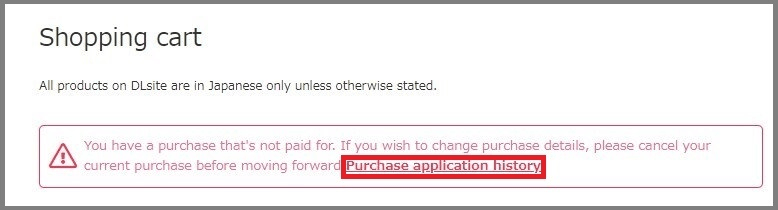
About Purchase Order History, DLsite says:
- Entries are deleted automatically within about a week, or you can press “Cancel order.” Canceling an unpaid or interrupted order has no penalty and returns the points or coupon.
- Do not cancel an order you have already paid. DLsite warns it will stop the work from appearing correctly in your Purchase History.
Sources: DLsite Help: not in Download History (Japanese), DLsite Help: Purchase Order History, DLsite Help: Paidy, DLsite Help: atone.
Card declined instead? See DLsite Card Declined? Official Fixes.
Cause 3: The Purchase History filter is hiding it
Purchase History is under Account → Purchase History on PC (on a phone, in the ≡ menu). Two things trip people up:
- It shows purchases in the current month by default. Choose the year and month of purchase and press Display.
- The Refine section filters by section (store floor, such as doujin or comics) and purchase time. If a work is missing, set the section to all.
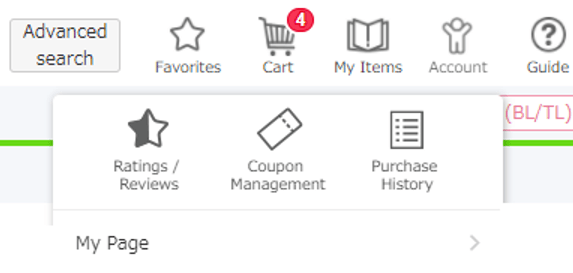
My Items in the header opens DLsite Play, which lists purchases by purchase date. In DLsite Play, choose “All” at the top of the library. Discontinued works don’t appear in DLsite Play, so check Purchase History (Download History) instead.
Two other “hide” settings do not affect your purchases. Hidden Products Settings on My Page only changes recommendations (“People who bought this item also bought” and similar). Display Settings for genres and product types only apply to the top page, new releases, rankings, and search results.
Sources: DLsite Help: checking your purchase history, DLsite Help: Downloading and Extracting (“All” in the DLsite Play library), DLsite Help: product purchase history, DLsite Help: Non-Displayed Product Settings, DLsite Help: product images not displayed.
Cause 4: It’s hidden or not synced in DLsite Play or Nest
DLsite Play: bringing a purchase back
Press Sync Library
It's in the DLsite Play side menu.
Check the Hidden Product List
Settings → Hidden Product List (play.dlsite.com/#/settings/ignore). Works hidden with the "Display in Library" toggle are listed there.
Clear cache and cookies, then restart the browser
Corrupted cache or cookies can stop purchases from showing.
Reset DLsite Play settings
Settings → "Reset all settings to defaults" (play.dlsite.com/clear.html), then restart the browser. DLsite says this does not delete any purchases.
DLsite Nest: click “Re-sync library” in the upper right. If that fails, exit Nest from the Windows task tray, uninstall it, and install the latest version from DLsite’s Nest page.
Sources: DLsite Help: purchases don’t display on DLsite Play, DLsite Help: hiding products in the library, DLsite Help: library (Nest).
Using DLsite Play on a phone? Recommended settings and the white-screen fix are in How to use DLsite on your phone.
Cause 5: Guest purchases and translated versions
- Guest purchases ended on January 9, 2019. To move an old guest purchase into your account, contact DLsite with the order number from the purchase confirmation email. DLsite erased personal data from guest records, so without the order number the transfer may not be possible. Source: DLsite Help.
- A later English version is often registered as a separate product with a different ID (RJ/BJ/VJ…). Buying the Japanese version generally doesn’t give you the English one (DLsite notes rare exceptions), unless the English data was added to the same product as an update. Source: DLsite Help. More in DLsite works in English.
Open DLsite in English to check your Purchase History
Found it? How to re-download
DLsite says you can download purchases “as many times as you like,” from the product page, Purchase History, DLsite Play, or DLsite Nest. Works marked ✖ under “Available for viewing” on the product page can’t be downloaded (they’re browser-only). Large works come as split files: download every part into the same folder.
If you change computers, log in with the same account. Compatible purchases can be downloaded on other PCs and phones.
Sources: DLsite Help: Downloading and Extracting, DLsite Help: another computer.
Step-by-step downloading, split files, and extraction errors: How to Download DLsite Purchases (and Re-download Them Later).
PlayDRM and license key errors
What PlayDRM is
PlayDRM is DLsite’s serial-key copy protection. A PlayDRM work comes with a 16-character license key, shown at the top of its download page. You enter it the first time you launch the work. After that, it runs without the key. No special viewer is needed.
To find the key: Purchase History → the work’s download (DL) button → the “Serial number confirmation and download” page.
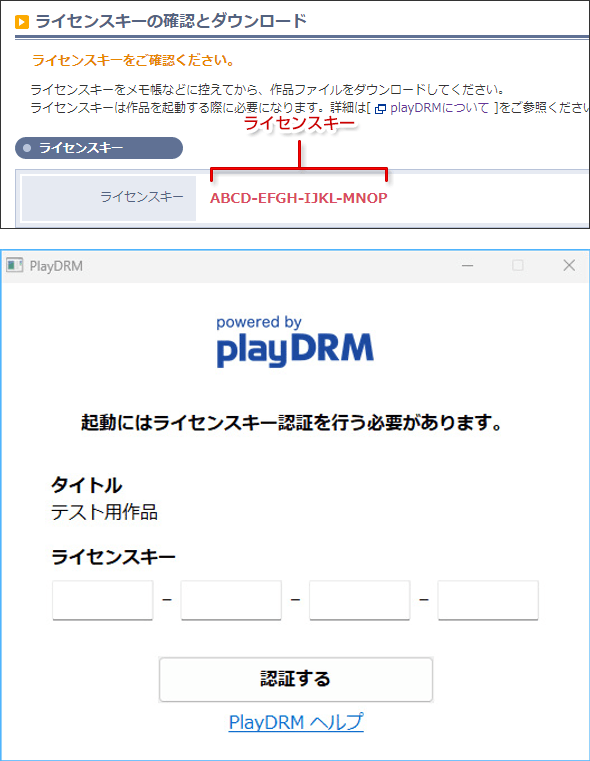
DLsite’s rules for PlayDRM works:
- Authentication needs an internet connection.
- There’s a limit on how many times a work can be installed. If you hit it in normal use, contact DLsite. Limits reached through unauthorized sharing won’t be reset.
- Reinstalling Windows means authenticating again.
- PlayDRM works don’t run in virtual machines (Virtual PC, VMware) or remote-access sessions (TeamViewer, LAPLINK and similar).
- Some security software, especially free antivirus made outside Japan, can block authentication. Temporarily disable it or add an exclusion for the product folder, then turn it back on.
Sources: DLsite Help: What is PlayDRM?, DLsite Help: license key location.
PlayDRM error codes
| Error code | Message | DLsite’s fix |
|---|---|---|
| (none) | “Internet connectivity is required for authentication.” | Check your internet connection |
| 1001, 2003, 2004 | “License key authentication failed.” | The key is wrong. Re-enter it, copying it from the work’s download button in Purchase History |
| 1002 to 1008 | “A communication error has occurred.” | Communication with DLsite may have failed. Temporarily disable your security software or add an exclusion for the product folder, try again, then turn it back on |
| (none) | “The product may not be installed correctly.” | Check the files are installed correctly, or re-download. Authentication itself is already complete |
Source: DLsite Help: PlayDRM error codes.
Other PlayDRM problems
| Problem | DLsite’s fix |
|---|---|
| A different serial number appears, or no license key screen | You started the wrong .exe. Run startup.exe if there is one. If there’s a “data” folder, run the .exe next to it, not the one inside |
| Still no license key screen with the right .exe | Security software may be blocking PlayDRM. Temporarily disable it or add an exclusion for the product folder, try again, then turn it back on |
| No .exe in the extracted folder | Security software probably quarantined it. Temporarily disable it, re-download and extract, then turn it back on |
| “Failed to connect to the authentication server” (connect ETIMEDOUT) | Something is interrupting the connection. Check firewall and security software. DLsite says dlsite.com must be reachable on port 443 |
| “Authentication limit exceeded” | Contact DLsite with the product name or number |
| Limit on authenticated devices / serial key reissues | Contact DLsite with the product number and the email you bought with |
| The game closes shortly after launch | DLsite has reports of Nahimic, Nahimic2, and SonicSuite interfering. Close them and try again |
Windows hides file extensions such as .exe by default; DLsite’s help explains how to show them.
“Failed to acquire product information” is a browser / DLsite Play error, not a PlayDRM one. DLsite’s fix is to clear your browser cache and cookies, then restart the browser.
Sources: DLsite Help: different serial number / authentication unsuccessful, DLsite Help: connect ETIMEDOUT, DLsite Help: authentication limit exceeded, DLsite Help: reissue limit (Japanese), DLsite Help: PlayDRM game closes, DLsite Help: failed to acquire product information, DLsite Help: security software settings.
Garbled text is a different problem
If a game starts but shows broken characters or “file not found,” the cause is usually a Windows language setting issue, not PlayDRM. See Fix garbled text in DLsite games.
FAQ
Q Can my DLsite purchase history really disappear?
DLsite’s viviON ID help says that for customers who contacted it, purchase history had almost never actually vanished. In most cases, they were logged into a different account. Use Reset Password with each email address you might have used to find every login ID.
Q Why does my Purchase History only show a few works?
It shows the current month by default. Choose the purchase month and set the section to all in the Refine area, then press Display.
Q Does resetting DLsite Play delete my purchases?
No. DLsite says resetting DLsite Play settings to defaults does not delete any purchases.
Q Where is my PlayDRM license key?
At the top of the work’s download page. Open Purchase History, click the download (DL) button next to the work, and the “Serial number confirmation and download” page shows the 16-character key.
Q I reinstalled Windows. Do I need to buy the game again?
No. DLsite says you need to authenticate again after reinstalling your operating system. If you reach the installation limit in normal use, contact DLsite with the product number.
Q I bought the Japanese version. Why don't I get the English one?
DLsite treats each product ID (RJ/BJ/VJ…) as a separate product. If the English version was released under a different ID, buying the Japanese one generally doesn’t include it (DLsite notes rare exceptions).
Summary
When a DLsite purchase seems to be missing, check the account first, then wait out slow payment methods, then widen the Purchase History filter and check DLsite Play’s Hidden Product List. Once you find the work, you can re-download it as often as you like. For PlayDRM, copy the 16-character key from the download page, run startup.exe, and if security software blocks it, temporarily disable it or add an exclusion, then turn it back on. If you can’t log in at all, start with our login and two-factor authentication guide.
Sources (checked November 14, 2026)
- DLsite Help: My Purchase History disappeared and the Japanese version
- DLsite Help: Purchased product(s) does not appear in my Download History and the Japanese version
- DLsite Help: About Purchase Order History
- DLsite Help: Checking your Purchase History and I want to check my product purchase history
- DLsite Help: My purchases don’t display on DLsite Play
- DLsite Help: I want to hide certain products in my library
- DLsite Help: Purchased product(s) don’t show up in my library
- DLsite Help: The product I purchased does not display in my library [DLsite GamePlay]
- DLsite Help: What are Non-Displayed Product Settings? and product images not displayed
- DLsite Help: Paidy orders and atone orders
- DLsite Help: Guest purchases
- DLsite Help: English version released later
- DLsite Help: Downloading and Extracting (including the “All” library filter in DLsite Play) and viewing purchases on a different computer
- DLsite Help: What is PlayDRM? and license key location
- DLsite Help: PlayDRM error codes
- DLsite Help: different serial number / authentication unsuccessful, connect ETIMEDOUT, authentication limit exceeded, reissue limit, game closes after launch, failed to acquire product information, security software settings
- viviON ID Help: When I logged in, my purchase history was all gone
More DLsite guides
- DLsite English Works on Sale Now (November 2026): 5 Discounted Games and ASMR Compared by Discount, End Date, and Price
- Can't Log In to DLsite? Fixes for Login Errors and Two-Factor Authentication (2026)
- How to Pay on DLsite from the US (2026): Cards, viviON Points, and What to Do When Your Card Is Declined
- DLsite Reward Points Not Received? Why Bonus Points Don't Show Up, and What to Check (2026)
- How to Use DLsite on Your Phone (iPhone and Android): Buy, Stream, Listen, and Play (2026)
- Are DLsite Point Codes From Unofficial Sellers Safe? The Official Seller List and the Suspension Risk (2026)
- DLsite vs Johren vs Nutaku: Where to Buy English Adult (18+) Games (2026)
- DLsite Weekly Picks (Nov 13–19, 2026): 5 English-Ready Works Trending This Week
- DLsite Gift Cards (2026): Where to Get viviON Point Codes Safely, and Whether You Can Gift Them
- How to Pay on DLsite from Hong Kong (2026): WeChat Pay HK, Cards via DPay, and JCB
- How to Pay on DLsite from Brazil (2026): PIX, PicPay, Mercado Pago, and Boleto
- How to Pay on DLsite from Chile, Colombia, and Peru (2026): Webpay, PSE, Nequi, PagoEfectivo
- How to Pay on DLsite from Europe and the UK (2026): Use DPay While WaffoPlay Cards Are Paused
- How to Pay on DLsite from Indonesia (2026): QRIS, DANA, OVO, and ShopeePay
- How to Pay on DLsite from Mexico (2026): OXXO, SPEI, Mercado Pago, and CARNET
- How to Pay on DLsite from Thailand (2026): PromptPay, TrueMoney, and ShopeePay
- How to Pay on DLsite from Malaysia (2026): Touch 'n Go, FPX, GrabPay, and Cards
- How to Pay on DLsite from the Philippines (2026): GCash, Maya, GrabPay, and Cards
- Can You Use PayPal on DLsite? No, Here's What Works Instead (2026)
- AI-Generated Works on DLsite: Labels, the AI Section, and How to Hide Them
- DLsite vs Steam: Where Should You Buy Japanese Indie (Doujin) Games? (2026)
- 7 DLsite Sleep ASMR Works You Can Enjoy in English (3 Are Free)
- 4 Popular DLsite ASMR and Voice Works With English Versions
- DLsite Card Declined? Official Fixes for Payment Errors Outside Japan (2026)
- Where to Buy viviON Points: DPay vs WaffoPlay vs For Books (2026)
- English-Ready DLsite Games: What's Popular and How to Choose (2026)
- DLsite Coupons and Sales (2026): Black Friday Sale Nov 20-26, How Coupons Work, and Bulk Buys
- How to Download DLsite Purchases (and Re-download Them Later): DLsite Play, Nest, Split Files, and Fixes
- Getting Started on DLsite (2026): Create an Account, Set Your Currency, and Grab the First Coupons
- Fix Garbled Text in DLsite Games on a Non-Japanese PC: System Locale, DLsite Nest, and AI Patches
- Is DLsite Safe? Card Statements, Emails, Purchase History, and Account Security (2026)
- Buying DLsite ASMR and Voice Works Without Speaking Japanese: Apps, Subtitles, and Hi-Res
- Using DLsite in English: How to Switch Language and Find Translated Works
- How to Pay on DLsite from Outside Japan (2026): Cards, viviON Points, and What Actually Works
- How to Buy viviON Points (DLsite Points) in 2026: 3 Steps, DPay, and Expiry
- DLsite Refund Policy and Common Problems for International Buyers