How to Pay on DLsite from the US (2026): Cards, viviON Points, and What to Do When Your Card Is Declined
Paying for DLsite from the United States? DLsite's checkout lists only JCB, so US buyers with a Visa, Mastercard, Amex, Apple Pay, or Google Pay can use them to buy viviON Points on DPay instead. USD vs yen, foreign transaction fees, PayPal, gift cards, WaffoPlay's status, and a step-by-step fix for declined cards. Checked November 14, 2026.
Affiliate disclosure
This article contains affiliate links to DLsite. Details are accurate as of the update date above; check the official site for the latest information.
Quick answer
- DLsite's checkout lists only JCB. Visa and Mastercard have been paused there since April 3, 2024, and Amex since April 4, 2024. Discover is not listed.
- DPay, which was marked "Recommended" on DLsite's Purchase Points page when last checked (October 23, 2026), accepts Visa, Mastercard, JCB, UnionPay, Amex, Apple Pay, and Google Pay. 1,000 points showed as about $6.56 on November 14, 2026, but the charge is settled in Taiwan dollars.
- USD prices on DLsite are estimates. DLsite charges in yen, DPay in Taiwan dollars, and your card issuer converts the amount and may add a foreign transaction fee.
- WaffoPlay has no US page. Its global page showed card payment, Google Pay, and Apple Pay as "Temporarily unavailable" on November 14, 2026; only USDT and USDC could be selected.
- PayPal, Venmo, and Cash App are not offered by DLsite, DPay, or WaffoPlay. We found no DLsite gift card sold in US stores.
This week's picks · Updated every FridayDLsite Weekly Picks (Nov 13–19, 2026): 5 English-Ready Works Trending This Week
Contents
- Which payment methods work from the US
- Why Visa, Mastercard, Amex, and Discover fail at DLsite’s checkout
- What about US banks blocking the charge?
- Dollars vs yen: what you’re actually charged
- Foreign transaction fees
- DPay: the main route for US cards
- How to buy viviON Points from the US (DPay)
- My card was declined: what to do next
- WaffoPlay: no US page, cards still paused
- PayPal, gift cards, and other options
- What to buy with your points
- Summary
- Sources (checked November 14, 2026)
If you’re in the US, the simplest way to pay on DLsite is to buy viviON Points on DPay with your Visa, Mastercard, Amex, Apple Pay, or Google Pay, then pay for works with those points. DLsite’s own checkout only lists JCB, so Visa, Mastercard, Amex, and Discover cards aren’t accepted there. DPay was marked “Recommended” on DLsite’s Purchase Points page when last checked (October 23, 2026). It adds the points straight to your DLsite account.
Everything below comes from DLsite’s official pages and the point sellers’ own pages, checked November 14, 2026. Sources are listed at the end.
Quick answer
- Visa / Mastercard / Amex at DLsite's checkout
- No Not accepted. The checkout lists only JCB
- Cards and wallets on DPay (to buy points)
- Yes Visa, Mastercard, JCB, UnionPay, Amex, Apple Pay, Google Pay
- Discover
- No Not listed at DLsite's checkout or on DPay
- PayPal, Venmo, Cash App
- No Not offered by DLsite, DPay, or WaffoPlay
- WaffoPlay serial codes
- Depends No US page. Global page: cards paused, only USDT and USDC
- Prices in USD
- Depends Estimates only. You're charged in yen (DLsite) or Taiwan dollars (DPay)
Checked on DLsite's payment guide, DLsite Help, DPay, and WaffoPlay (November 14, 2026)
Which payment methods work from the US
| Method | Works from the US? | Currency and fees | Notes |
|---|---|---|---|
| DPay (buy viviON Points) | Yes. Accepted brands: Visa, Mastercard, JCB, UnionPay, Amex, Apple Pay, Google Pay | Settled in Taiwan dollars (TWD). USD is “only for reference.” Your issuer may add a foreign transaction fee | Points added automatically. Asks for your DLsite ID and password (enter them only on global.dlpoint.net). No refunds |
| JCB credit card at DLsite’s checkout | Depends. JCB is the only listed brand, and DLsite says cards issued outside Japan “may not work” | Charged in yen. “You may be required to pay an international transaction fee” | Statement says “DLsite,” without titles |
| Visa, Mastercard, Amex at DLsite’s checkout | No. Paused since April 2024 and not listed | — | Use the same card on DPay instead |
| Discover | No. Not listed at DLsite’s checkout or on DPay | — | DPay doesn’t say whether a Discover card inside Apple Pay or Google Pay works |
| Debit and prepaid cards at DLsite’s checkout | Depends. “Not fully supported” | A small authorization charge may appear and be refunded later | DLsite only officially accepts credit cards |
| WaffoPlay (serial codes) | Depends. No US page. Global page: card, Google Pay, Apple Pay “Temporarily unavailable”; USDT and USDC selectable | Priced in yen. You pay any “currency exchange fees” | Code valid 180 days. From 500 points |
| DLpay Crypto | Only with crypto: tokens such as USDT, paid through Helio | Prices shown as USD estimates | On DLsite’s official seller list |
| PayPal, Venmo, Cash App | No | — | Not on DLsite, DPay, or WaffoPlay. Don’t confuse PayPal with PayPay, a Japanese app |
| Gift cards in US stores | No | — | We found no retail DLsite gift card in the US. For Books has ended its gift card sales |
| Convenience store, online banking, pay later | No | — | DLsite lists these “for domestic purchases within Japan” |
Sources: DLsite: About Payment Methods, DLsite Help: Available Payment Methods, DLsite Help: card errors, DPay store, WaffoPlay (global), DLpay Crypto, For Books.
Why Visa, Mastercard, Amex, and Discover fail at DLsite’s checkout
DLsite’s payment guide lists a single accepted card brand: JCB.
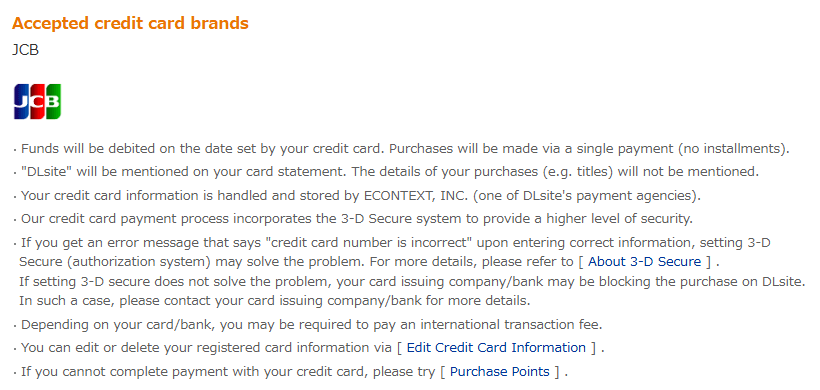
DLsite paused Visa and Mastercard on April 3, 2024, and American Express on April 4, 2024 (official notice, Japanese). We found no notice that they have returned, and the payment guide still lists only JCB on November 14, 2026. Discover isn’t listed either. So if your card is a Visa, Mastercard, Amex, or Discover, DLsite’s own checkout is not the place to use it.
Even a JCB card isn’t guaranteed. DLsite’s help says:
“Prepaid, debit, and cards issued outside of Japan may not work.” — DLsite Help
DLsite’s advice for this case is short: “If you cannot complete payment with your credit card, please try [Purchase Points].”
What about US banks blocking the charge?
DLsite doesn’t publish any US-specific rule, and we found no official statement from DLsite or US card issuers about how they treat DLsite charges. What DLsite does say:
- If 3-D Secure is set up and payment still fails, “your card issuing company/bank may be blocking the purchase on DLsite.” Contact them.
- “As we cannot tell what the cause is from our end, you should try contacting your card issuer.” DLsite can’t see why your bank said no.
- Your card “may have restrictions in place related to how much can be spent in a single transaction.”
If a card is declined, DLsite can’t see the reason, so your card issuer is the first place to ask. Declines can also come from temporary restrictions after repeated failed attempts, or from an outage on the payment processor’s side. Asking your issuer whether international online purchases are allowed on your card is a reasonable first question.
For example, DLsite posted a notice on July 15, 2026, that some payments with cards issued outside Japan could fail; it was marked resolved that evening (notice, Japanese). If many payments fail at once, check DLsite’s notice page before calling your bank.
Dollars vs yen: what you’re actually charged
You can set DLsite to show prices in US dollars. It’s one of 20 display currencies, chosen from the language and currency menu at the top of the site.
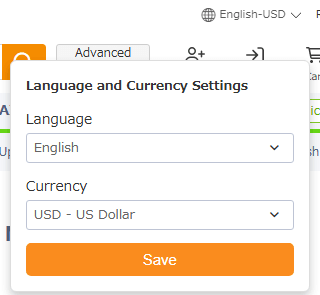
The dollar prices are only a guide. DLsite’s payment guide says:
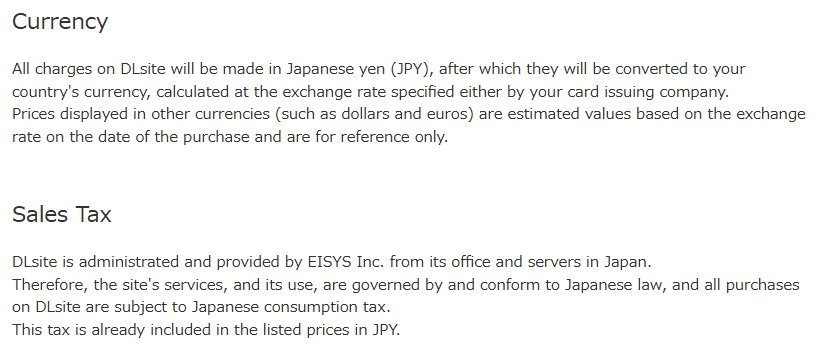
What this means for a US buyer:
| Where you pay | Currency charged | What your card statement shows |
|---|---|---|
| DLsite checkout (JCB) | Japanese yen (JPY) | “DLsite,” without product titles |
| DPay | Taiwan dollars (TWD). “USD price is only for reference.” | DPay doesn’t say. Its disclosure page lists Payletter as the payment method |
| WaffoPlay | Prices shown in yen | Not stated on its pages |
- viviON Points are always 1 point = 1 yen, whatever display currency you pick. A ¥1,100 work costs 1,100 points.
- Japanese consumption tax is already included in DLsite’s yen prices. DLsite doesn’t mention US state sales tax.
- The final amount is the purchase total “plus any additional handling / exchange rate fees determined by the card issuer, the payment service provider, or the point purchase subcontractor,” per DLsite Help.
Foreign transaction fees
DLsite’s guide says that “depending on your card/bank, you may be required to pay an international transaction fee.” DPay’s checkout says “Fees may vary due to exchange rate,” and WaffoPlay’s terms say you’re responsible for “currency exchange fees.”
Since DLsite charges in yen and DPay in Taiwan dollars, a US card may treat either one as a foreign transaction. Some US cards add a foreign transaction fee and some don’t. Look for “foreign transaction fee” in your cardholder agreement, or ask your bank. We can’t tell you what your card will charge.
DPay: the main route for US cards
DPay is a point-sales site that DLsite officially authorizes. It’s run by Tenyi SmartHub Co., Ltd. in Taiwan. When this site checked DLsite’s [Purchase Points] page on October 23, 2026, DPay was listed under “How to pay from outside of Japan” and marked “Recommended.” That page needs a login, so we couldn’t re-open it on November 14. DPay’s own pages were re-checked that day.
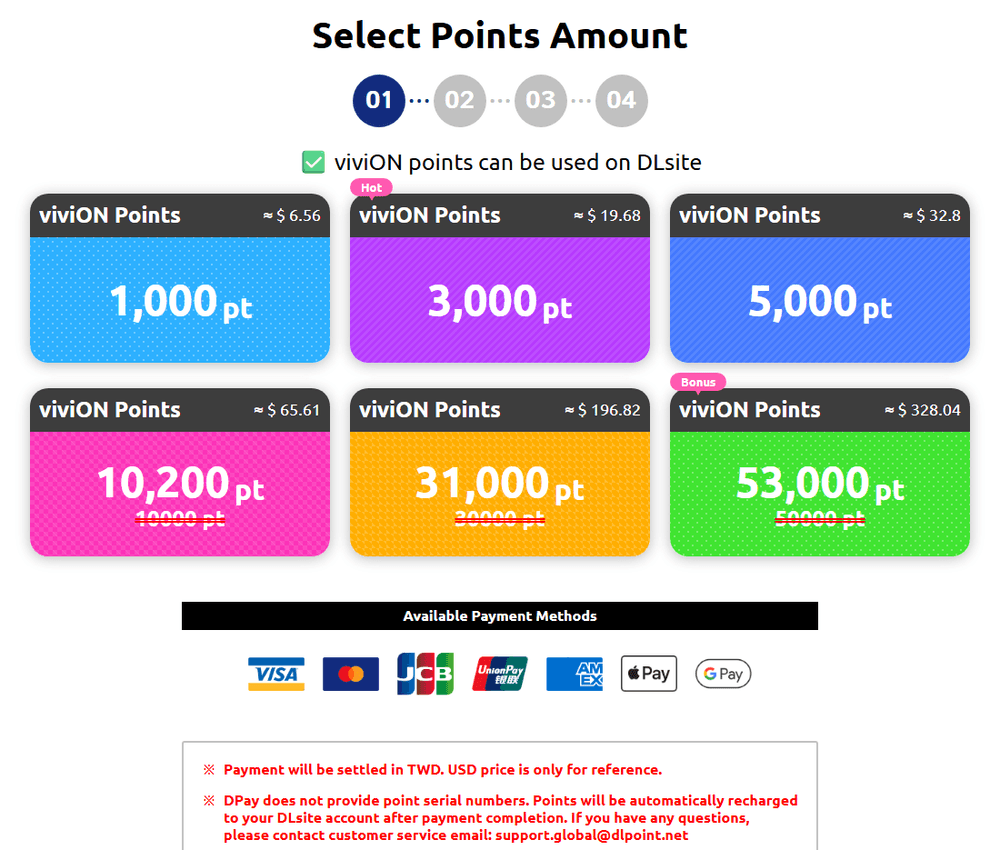
| You get | DPay’s USD estimate (Nov 14, 2026) |
|---|---|
| 1,000 points | ≈ $6.56 |
| 3,000 points | ≈ $19.68 |
| 5,000 points | ≈ $32.80 |
| 10,200 points (10,000 + bonus) | ≈ $65.61 |
| 31,000 points (30,000 + bonus) | ≈ $196.82 |
| 53,000 points (50,000 + bonus) | ≈ $328.04 |
What to know before you buy:
- Accepted: Visa, Mastercard, JCB, UnionPay, American Express, Apple Pay, and Google Pay. Discover is not shown.
- Currency: “Payment will be settled in TWD. USD price is only for reference.” DPay also warns that the estimate “may not use the latest exchange rate.”
- No serial code. DPay “does not provide point serial numbers.” Points are added to your DLsite account after payment, and DPay emails you once they’re credited.
- No refunds once sold.
- It asks for your DLsite password. The checkout has fields for your DLsite Account ID and DLsite Password, with the note “The password is used for account verification only.” Enter them only on DPay’s official domain, global.dlpoint.net, ideally opened from My Page → [Purchase Points]. If any other site asks for your DLsite password, don’t enter it.
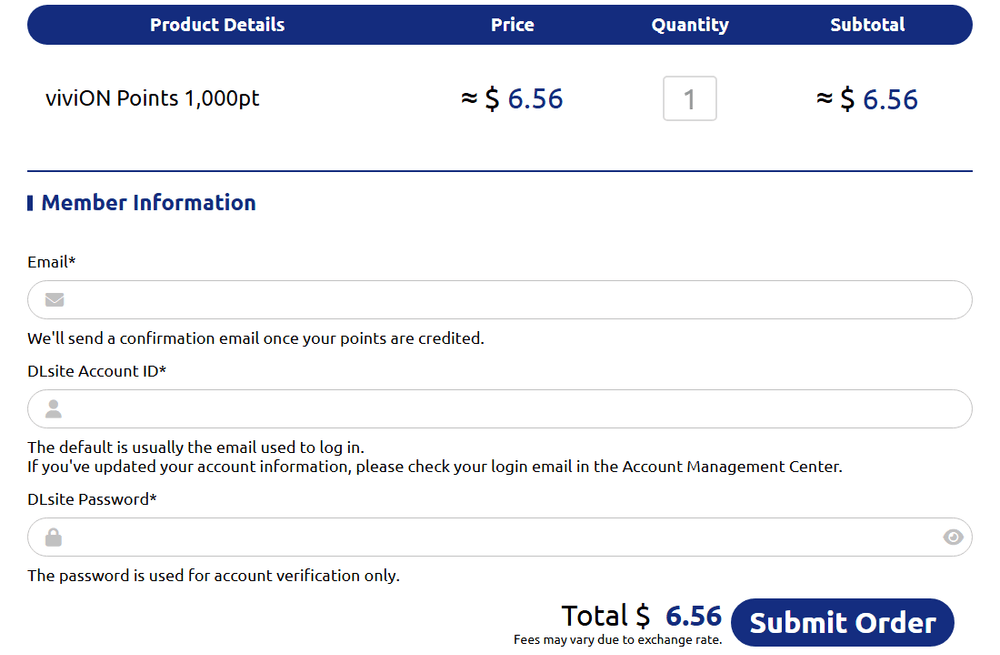
DPay is on DLsite’s official seller list, and its footer says it is “officially authorized by DLsite.” Separately, DLsite’s general security advice is not to reuse the same ID and password across services and to check your Login History regularly (DLsite Help). DPay’s pages don’t say how it handles accounts with two-step verification turned on.
How to buy viviON Points from the US (DPay)
Buying viviON Points on DPay from the US
Create or log in to your DLsite account
Registration is free. If you like, set the display currency to USD from the language and currency menu at the top of the site. Prices in USD are estimates only.
Open DPay from DLsite
Go to My Page → [Purchase Points] and choose "DPay - Global Payment Methods" under "How to pay from outside of Japan." Opening it from DLsite helps you reach the official seller; check that the address is global.dlpoint.net.
Pick a pack
Packs start at 1,000 points (about $6.56 on November 14, 2026). The 10,000, 30,000, and 50,000 packs include bonus points.
Enter your email, DLsite Account ID, and password
Enter them only on global.dlpoint.net. The Account ID is usually the email you log in with. DPay says the password is used for account verification only. If any other site asks for your DLsite password, don't enter it.
Pay with your card, Apple Pay, or Google Pay
The charge is settled in Taiwan dollars, so your bank converts it. Your bank may ask you to confirm the payment in its app. If it fails, don't retry over and over: DLsite says many attempts in a short time can trigger security restrictions.
Check your balance, then pay with points
DPay emails you when the points are credited. On DLsite, add works to your cart, go to checkout, click [Use your points], and enter the number of points.
Open DLsite’s Purchase Points page (sign-in required)
Points expire one year after you last earn or use points. More on packs and expiry: viviON Points guide.
My card was declined: what to do next
Go through these in order. The steps are based on DLsite’s help pages and the sellers’ own pages, plus general card advice where noted.
Card declined on DLsite: what next?
-
Q1 Was it a Visa, Mastercard, Amex, or Discover card at DLsite's own checkout?
Yes That's expected: the checkout lists only JCB. Buy viviON Points on DPay with Visa, Mastercard, Amex, Apple Pay, or Google Pay instead (Discover isn't listed on DPay either).
-
Q2 Was it a JCB card that says "credit card number is incorrect" even though the number is right?
Yes Set up 3-D Secure on your card issuer's website, then try once more. If it still fails, DLsite says your issuer may be blocking the purchase, so call them.
-
Q3 Was it a debit or prepaid card at DLsite's checkout?
Yes DLsite says debit and prepaid cards are "not fully supported." If a small amount is taken from your bank account right after you use one, DLsite says it's a card check, not a fee, and will be refunded. Use a credit card, or buy points on DPay.
-
Q4 Does a small order go through while a big one fails?
Yes Your card may have a per-transaction limit. Lower the amount or split the order.
-
Q5 Did the payment fail on DPay?
Yes Wait before retrying, since repeated attempts can trigger security restrictions. General card advice: ask your bank whether the charge was declined or flagged, or try Apple Pay or Google Pay. Contact DPay at support.global@dlpoint.net if you were charged without getting points.
-
None of the above
Close other DLsite tabs, turn off ad blockers and security plugins, clear cache and cookies or try another browser, and wait a while. If it still fails, contact your card issuer: DLsite says it can't see why a card company refuses a charge.
The full list of DLsite’s fixes, with sources, is in DLsite card declined? Official fixes.
WaffoPlay: no US page, cards still paused
WaffoPlay is another official seller. It emails you a 16-character serial code that you enter on DLsite. It has pages for about 20 regions, but none for the US: dlsite.waffoplay.com/us returned “not found” on November 14, 2026. The global page is open to everyone, and on November 14 its payment list looked like this:
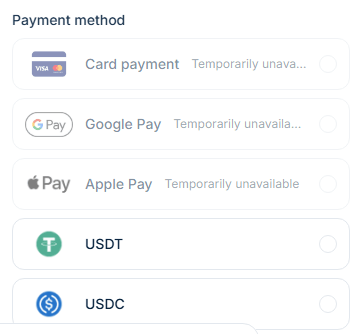
- Card payment, Google Pay, and Apple Pay: “Temporarily unavailable.” They were also unavailable on November 1, 2026.
- USDT and USDC (stablecoins) could be selected.
- Packs run from 500 points (¥500) to 30,000 points (¥29,400). Prices are in yen.
- The code is valid for 180 days, and codes “cannot be returned or canceled after purchase.”
So for a US buyer paying by card, WaffoPlay isn’t an option right now. Use DPay. Source: WaffoPlay (global).
PayPal, gift cards, and other options
- PayPal, Venmo, Cash App: none of them appear on DLsite’s payment guide, DPay, or WaffoPlay’s global page. The PayPay on DLsite’s list is a Japanese QR payment app, not PayPal. More: Can you use PayPal on DLsite?
- Gift cards: we found no DLsite gift card sold in US stores. For Books, which used to sell gift cards, says on its site that gift card sales have ended. In Japan, DLsite’s help describes buying serial codes for cash at Ministop stores through mobile POSA (DLsite Help, Japanese), which doesn’t help from the US. More: DLsite gift cards.
- Crypto: DLpay Crypto, on DLsite’s official list, sells points paid with tokens such as USDT through Helio.
- Resellers and marketplaces: avoid them. DLsite’s help says its list contains “the only places to legitimately buy viviON points,” and that if you use a code from elsewhere, “your account will be suspended upon discovery.” Source: DLsite Help.
The official list (November 14, 2026): For Books, Point Market, Dianshu.jp, DLpay Taiwan, DLpay Crypto, DPay, WaffoPlay, and PtPtPoints. DLsite asks you to open them from My Page → [Purchase Points]. Compare them in Where to buy viviON Points.
Check DLsite’s official payment page (English)
What to buy with your points
Once the points are in your account, works on sale cost fewer points. A banner on DLsite advertised a coupon for new accounts on November 14, 2026; check its conditions when you register. Two good places to start are English-ready games and voice works:
- English-ready DLsite games
- 4 popular ASMR and voice works with English versions
- Coupons and sales on DLsite
Browse English-ready games on DLsite
Check the language on the product page before you buy: a translated version is usually a separate product from the Japanese original.
FAQ
Q Can I use my US Visa or Mastercard on DLsite?
Not at DLsite’s own checkout, which lists only JCB. You can use the same card on DPay to buy viviON Points, then pay for works with points. DPay was marked “Recommended” on DLsite’s Purchase Points page when last checked (October 23, 2026). Enter your DLsite ID and password only on global.dlpoint.net.
Q Does DLsite take Discover?
Discover isn’t listed at DLsite’s checkout or among DPay’s payment methods (November 14, 2026). DPay doesn’t say whether a Discover card added to Apple Pay or Google Pay works.
Q Am I charged in dollars?
No. DLsite charges in Japanese yen and DPay settles in Taiwan dollars. USD prices on both sites are estimates. Your card issuer converts the amount and may add a foreign transaction fee.
Q Can I pay with PayPal, Venmo, or Cash App?
No. None of them are offered by DLsite, DPay, or WaffoPlay. Use a card, Apple Pay, or Google Pay on DPay.
Q Why does my bank decline DLsite?
DLsite can’t see why a card company refuses a charge, and it doesn’t publish any US-specific rule. Its help says your issuer may be blocking the purchase and asks you to contact them. Many attempts in a short time can also trigger security restrictions.
Q Is DPay safe to use?
DPay is on DLsite’s official list of point sellers, and its footer says it is “officially authorized by DLsite.” Its checkout asks for your DLsite password: enter it only on DPay’s official domain, global.dlpoint.net, ideally opened from My Page → [Purchase Points], and never on any other site that asks for it. DLsite’s general advice is not to reuse passwords across services and to check your Login History.
Q Do I pay US sales tax on DLsite?
DLsite’s guide says all purchases include Japanese consumption tax in the yen price. It doesn’t mention US state sales tax.
Summary
From the US, buy viviON Points on DPay with a Visa, Mastercard, Amex, Apple Pay, or Google Pay, then pay with points. DLsite’s own checkout takes only JCB, and even then cards issued outside Japan may not work. Expect the charge in Taiwan dollars (DPay) or yen (DLsite), not dollars, and check your card for foreign transaction fees. WaffoPlay has no US page, and its card options were still paused on November 14, 2026. PayPal isn’t available anywhere in the chain.
Payment rules change, so check DLsite’s payment page and the [Purchase Points] page in My Page before you buy.
Related guides:
- How to pay on DLsite from outside Japan
- DLsite card declined? Official fixes
- viviON Points: how to buy, expiry, and rewards
- Getting started on DLsite
- Is DLsite safe?
Sources (checked November 14, 2026)
- DLsite: About Payment Methods: JCB only, yen charges, USD prices for reference, Japanese consumption tax, international transaction fee, debit/prepaid notes, “try Purchase Points”
- DLsite Help: I get an error message when paying with or registering a (credit) card: cards issued outside Japan may not work, browser fixes, per-transaction limits, contact your issuer
- DLsite Help: About 3-D Secure
- DLsite Help: About Currency Display Settings: 20 display currencies including USD, fees from the card issuer or point seller
- DLsite Help: When buying a product on DLsite, what currency will I be billed in?
- DLsite Help: An error occurs when attempting to purchase points: repeated attempts can trigger restrictions
- DLsite Help: I want to use points for a purchase
- DLsite Help: What are viviON Points?: 1 point = 1 yen, one-year expiry
- DLsite Help: Available Payment Methods: no PayPal; PayPay and Japan-only methods
- DLsite Help: official point sellers
- DLsite Help: Preventing unauthorized access: don’t reuse IDs and passwords, check Login History
- DLsite Help: Ministop (mobile POSA), Japanese
- DLsite notice: Visa and Mastercard paused (April 3, 2024; Amex April 4, 2024), Japanese
- DLsite notice: some payments with cards issued outside Japan could fail (July 15, 2026, resolved), Japanese
- DPay store, DPay checkout, DPay disclosure: packs, payment methods, TWD settlement, password field, Payletter, no refunds
- WaffoPlay (global) and WaffoPlay terms: payment method status, packs, 180-day codes, currency exchange fees
- DLpay Crypto: token payments through Helio
- For Books: gift card sales ended
More DLsite guides
- DLsite English Works on Sale Now (November 2026): 5 Discounted Games and ASMR Compared by Discount, End Date, and Price
- Can't Log In to DLsite? Fixes for Login Errors and Two-Factor Authentication (2026)
- DLsite Purchase Missing? Find Your Works, Fix Purchase History and PlayDRM Errors (2026)
- DLsite Reward Points Not Received? Why Bonus Points Don't Show Up, and What to Check (2026)
- How to Use DLsite on Your Phone (iPhone and Android): Buy, Stream, Listen, and Play (2026)
- Are DLsite Point Codes From Unofficial Sellers Safe? The Official Seller List and the Suspension Risk (2026)
- DLsite vs Johren vs Nutaku: Where to Buy English Adult (18+) Games (2026)
- DLsite Weekly Picks (Nov 13–19, 2026): 5 English-Ready Works Trending This Week
- DLsite Gift Cards (2026): Where to Get viviON Point Codes Safely, and Whether You Can Gift Them
- How to Pay on DLsite from Hong Kong (2026): WeChat Pay HK, Cards via DPay, and JCB
- How to Pay on DLsite from Brazil (2026): PIX, PicPay, Mercado Pago, and Boleto
- How to Pay on DLsite from Chile, Colombia, and Peru (2026): Webpay, PSE, Nequi, PagoEfectivo
- How to Pay on DLsite from Europe and the UK (2026): Use DPay While WaffoPlay Cards Are Paused
- How to Pay on DLsite from Indonesia (2026): QRIS, DANA, OVO, and ShopeePay
- How to Pay on DLsite from Mexico (2026): OXXO, SPEI, Mercado Pago, and CARNET
- How to Pay on DLsite from Thailand (2026): PromptPay, TrueMoney, and ShopeePay
- How to Pay on DLsite from Malaysia (2026): Touch 'n Go, FPX, GrabPay, and Cards
- How to Pay on DLsite from the Philippines (2026): GCash, Maya, GrabPay, and Cards
- Can You Use PayPal on DLsite? No, Here's What Works Instead (2026)
- AI-Generated Works on DLsite: Labels, the AI Section, and How to Hide Them
- DLsite vs Steam: Where Should You Buy Japanese Indie (Doujin) Games? (2026)
- 7 DLsite Sleep ASMR Works You Can Enjoy in English (3 Are Free)
- 4 Popular DLsite ASMR and Voice Works With English Versions
- DLsite Card Declined? Official Fixes for Payment Errors Outside Japan (2026)
- Where to Buy viviON Points: DPay vs WaffoPlay vs For Books (2026)
- English-Ready DLsite Games: What's Popular and How to Choose (2026)
- DLsite Coupons and Sales (2026): Black Friday Sale Nov 20-26, How Coupons Work, and Bulk Buys
- How to Download DLsite Purchases (and Re-download Them Later): DLsite Play, Nest, Split Files, and Fixes
- Getting Started on DLsite (2026): Create an Account, Set Your Currency, and Grab the First Coupons
- Fix Garbled Text in DLsite Games on a Non-Japanese PC: System Locale, DLsite Nest, and AI Patches
- Is DLsite Safe? Card Statements, Emails, Purchase History, and Account Security (2026)
- Buying DLsite ASMR and Voice Works Without Speaking Japanese: Apps, Subtitles, and Hi-Res
- Using DLsite in English: How to Switch Language and Find Translated Works
- How to Pay on DLsite from Outside Japan (2026): Cards, viviON Points, and What Actually Works
- How to Buy viviON Points (DLsite Points) in 2026: 3 Steps, DPay, and Expiry
- DLsite Refund Policy and Common Problems for International Buyers