Can't Log In to DLsite? Fixes for Login Errors and Two-Factor Authentication (2026)
DLsite login not working? Official fixes for "Login ID/password combination you entered is incorrect," "Login failed," forgotten IDs, missing reset emails, login loops, and two-factor authentication: setup, code errors, and what to do if you lost your phone.
Affiliate disclosure
This article contains affiliate links to DLsite. Details are accurate as of the update date above; check the official site for the latest information.
Quick answer
- "Incorrect" errors: your login ID may not be your email address. Accounts created up to October 2017 (when DLsite and NijiGAME accounts were merged) used a custom alphanumeric ID. The password reset email (or the page its link opens) shows your login ID.
- "Login failed" or a page that never loads: go back to the DLsite top page, clear cache and cookies, restart the browser, and never log in from a bookmarked login page.
- Two-factor authentication uses an authenticator app with a 6-digit code that changes every 30 seconds. If correct codes fail, set your phone's clock to automatic.
- Lost or replaced the phone with your authenticator app? DLsite sends you to its Reset Two-Factor Authentication form. DLsite's help center does not mention backup codes.
- DLsite confirms it sent the November 2026 email about two-factor authentication, but sender names can be spoofed: open the setup page yourself. DLsite never asks for your password by email or through an inquiry.
This week's picks · Updated every FridayDLsite Weekly Picks (Nov 13–19, 2026): 5 English-Ready Works Trending This Week
Contents
- Find your fix in 30 seconds
- Login errors: cause and fix
- Error: “Login ID/password combination you entered is incorrect”
- Fixing “Login failed,” login loops, and pages that never load
- Forgot your login ID or password
- The reset email doesn’t arrive
- Social logins, second accounts, and “already registered”
- Account locked, VPNs, and regions: what DLsite says
- Two-factor authentication (2FA) on DLsite
- How it works
- How to turn it on
- The authentication code is rejected
- Lost your phone or deleted the authenticator app?
- How to turn 2FA off
- Is the “Please Strengthen Your Security” email real?
- Keep an eye on your account after you get back in
- Summary
- Sources (checked November 14, 2026)
Most DLsite login problems are fixed in a few minutes: check which login ID you use, clear DLsite’s cookies, and log in from the DLsite top page instead of a bookmark. Locked out by two-factor authentication? DLsite has a reset form for that. Everything below comes from DLsite’s official help center (English, with the Japanese original where the English page is shorter), checked on November 14, 2026.
Quick answer
- "Login ID/password combination you entered is incorrect"
- Check the login ID type (email or custom ID), Caps Lock, and spaces. Then reset your password
- "Login failed" or stuck on the login page
- Yes Return to the DLsite top page, clear cache and cookies, restart the browser
- Forgot your login ID
- Yes The password reset email (or the page its link opens) shows it. Try every email address you might have used
- Reset email never arrives
- Depends Check for typos and spam. Allow mail from @dlsite.com
- Lost the phone with your authenticator app
- Depends Use DLsite's Reset Two-Factor Authentication form
- Backup or recovery codes for 2FA
- No Not mentioned in DLsite's or viviON's help (checked November 14, 2026)
Checked on DLsite's official help center (November 14, 2026)
Find your fix in 30 seconds
Can't log in to DLsite?
-
Q1 Does it say "Login ID/password combination you entered is incorrect"?
Yes Check your login ID type and typing (below). If it still fails, reset your password.
-
Q2 Does it say "Login failed," or does the login page never finish loading?
Yes Go to the DLsite top page, clear cache and cookies, restart your browser, and log in again.
-
Q3 Did you forget your login ID or password?
Yes Use Reset Password. The reset email (or the page its link opens) shows your login ID.
-
Q4 Does it ask for a 6-digit authentication code that keeps failing?
Yes Enter the newest code and set your phone's date and time to automatic.
-
Q5 Did you delete the authenticator app or lose the phone?
Yes Use the Reset Two-Factor Authentication form.
-
Q6 Can you log in, but your purchases are missing?
Yes You are probably in a different account. See our purchase history guide.
-
None of the above
Contact DLsite support through its inquiry form. Never send your password.
Login errors: cause and fix
| What you see | Likely cause | What to do |
|---|---|---|
| “Login ID/password combination you entered is incorrect.” | Wrong login ID type, Caps Lock, similar characters, extra spaces, old browser | Work through the checklist below, then reset your password |
| “Login failed” | Session timed out, or broken cache and cookies | Return to the DLsite top page and log in again. If that fails, clear cache and cookies and restart the browser |
| “Session expired” / timeout | The page was left open too long | Log in again. Close extra browser tabs and windows |
| Stuck on the login page or the adult-content check | Corrupted temporary files or cookies | Delete DLsite’s cookies, then use a recommended browser |
| The reset link shows an error instead of the reset screen | Broken cache and cookies (Japanese help) | Clear cache and cookies, restart the browser, open the link again |
| Reset email says no account was found | Different email address, or a date of birth that does not match | Try your other email addresses. If it keeps failing, contact DLsite |
| “Email address is already registered” | You already have a viviON ID with that email | Use the account merge feature, or check your login ID with Reset Password |
Sources: DLsite Help: incorrect login ID/password, DLsite Help: “Login failed”, viviON ID Help: session expired, DLsite Help: stuck on the login page, DLsite Help (Japanese): reset link error, viviON ID Help: account not found, viviON ID Help: login authentication failing.
DLsite accounts are viviON IDs, the shared ID for DLsite, Ci-en, comipo, NijiGAME, and other viviON services. That is why some help pages live on help.vivionid.com and why the login screen is on login.dlsite.com. Source: DLsite Help: official viviON email.
Error: “Login ID/password combination you entered is incorrect”
DLsite’s checklist for this message:
- Your login ID may not be your email address. You can set a login ID other than your email. Accounts created up to October 2017 (when DLsite and NijiGAME accounts were merged) were asked to set their own login ID, so older accounts often use an alphanumeric ID.
- Upper and lower case. Login IDs and passwords are case-sensitive. Check Caps Lock.
- Half-width characters only. If you use a Japanese, Chinese, or Korean input method, switch it to half-width (direct) input.
- Similar characters. For example 1 and I, 2 and Z, 5 and S, 0 and O.
- Spaces. Make sure there is no space before or after what you typed.
- Old browser. Update your browser (and operating system) to the latest version.
If it still fails, reset your password (next section).
Sources: DLsite Help (Japanese), viviON ID Help, DLsite Help: purchase history disappeared (account merger in October 2017).
Fixing “Login failed,” login loops, and pages that never load
Fixing "Login failed" and login loops
Go back to the DLsite top page and log in again
DLsite says your session may have timed out. Start from the DLsite top page (www.dlsite.com).
Stop using a bookmarked login page
DLsite says you cannot log in by opening the login page from a bookmark. Bookmark the DLsite top page instead and log in from there.
Clear cache and cookies, then restart the browser
Broken cache or cookies can cause the error. DLsite's Japanese help and the viviON ID help say to restart the browser after clearing them. DLsite's help has a page that deletes all DLsite cookies at once.
Use a recommended browser
DLsite recommends the latest Microsoft Edge, Safari, Google Chrome, or Mozilla Firefox, with JavaScript and cookies enabled.
Sources: DLsite Help: “Login failed” (Japanese), viviON ID Help: session expired, DLsite Help: stuck on the login page, DLsite Help: how to delete cookies, DLsite Help: clearing cached files.
The same cookie problem can stop you at the adult-content age check. Deleting DLsite’s cookies is DLsite’s fix for both.
Forgot your login ID or password
The English help page is short (“Your Login ID can be found on the Reset Password screen”). DLsite’s Japanese help explains the full flow:
Resetting your DLsite password (and finding your login ID)
Open Reset Password
The page is login.dlsite.com/password/forgot. You can also reach it from the login screen.
Enter an email address you may have registered with
DLsite asks you to try every email address you might have used.
Check for the email from support@dlsite.com
If the address is registered, the email has a link to reset your password and check your login ID. If it is not, the reply says no registration was found, so try another address.
Open the link: your login ID is shown
If you remember your password, just log in with that ID.
Or set a new password
The Japanese help gives the rule: 8 to 20 characters, with at least one half-width letter and one number. Then log in.
Sources: DLsite Help: forgotten login ID/password (Japanese version with full steps), viviON ID Help.
Changing your password generally does not change your login ID. Source: viviON ID Help.
The reset email doesn’t arrive
DLsite’s checklist, in order:
- Typos. The most common cause. Watch for “.con” instead of “.com,” “gmai.com,” and spaces. Copy and paste your address.
- Spam folder. Check junk and spam, and allow mail from @dlsite.com.
- A different address. If you are registering, try a free webmail address.
If you are already registered but can no longer use your registered email address, these steps will not help. Send DLsite the details through its inquiry form. DLsite checks your registration and replies by email. If you also forgot your login ID, the viviON ID help asks you to give your details “with as much accuracy and detail as possible.”
Sources: DLsite Help: emails not arriving, viviON ID Help.
Watch out for fake DLsite emails
DLsite says emails claiming to be from DLsite but sent from addresses other than @dlsite.com may be fraudulent. viviON ID notices can also come from info (at) vivionid.com. Because sender names can be spoofed, the safest habit is to open www.dlsite.com or login.dlsite.com yourself rather than clicking links in any email.
Sources: DLsite Help: emails not arriving, DLsite Help: official viviON email.
Social logins, second accounts, and “already registered”
You can log in with a login ID and password, or with a third-party service. If you once signed up through a social account without linking it to your existing account, you created a second, empty account. You can log in, but your purchases are not there.
- Linked social accounts are managed in Third Party Service Account Association Settings (login.dlsite.com/user/self/sns). You can link several and unlink them at any time.
- The DLNiji Account Merger page (login.dlsite.com/user/self/merge) shows which viviON services (DLsite user, circle, NijiGAME) are active on your ID.
- If DLsite says your email address is already registered, you probably already have a viviON ID with that address. Merge the IDs, or check the login ID with Reset Password.
Sources: DLsite Help: logging in and out, DLsite Help: purchase history disappeared, DLsite Help: purchases don’t display on DLsite Play, viviON ID Help: third-party logins, viviON ID Help: login authentication failing, viviON ID Help: purchase history gone.
Logged in but your works are gone? See DLsite Purchase Missing? Find Your Works.
Account locked, VPNs, and regions: what DLsite says
- Locked account: the only lock DLsite’s help mentions is for two-factor authentication: “if you exceed the maximum number of authentication errors, your account will be temporarily locked.” Wait, then try again. DLsite does not say how long the lock lasts. Source: DLsite Help.
- VPNs and regions: we found no article in DLsite’s English or Japanese help center, or the viviON ID help, about VPNs or country blocks for logging in (checked November 14, 2026). Treat any claim that DLsite blocks logins from certain countries as unconfirmed. If logins fail only on a VPN, contact DLsite support.
- Overseas use of 2FA: DLsite says its app-based 2FA “can be used safely overseas as it doesn’t require an internet connection or the ability to receive text messages.” Source: DLsite Help.
Two-factor authentication (2FA) on DLsite
How it works
After your login ID and password, DLsite asks for a 6-digit authentication code from an authenticator app on your phone, such as Google Authenticator. On iOS 15 and later, the built-in Passwords feature can also do it. The setup screen adds that any app supporting time-based one-time passwords (TOTP) works. There are no text-message codes.
Turning it on once covers the whole viviON ID: the DLsite Sound, DLsite Nest, DLPlayBox, and DL Library apps, and DLsite, NijiGAME, Ci-en, DLChannel, chobit, and triokini.
Sources: DLsite Help: what is 2FA, DLsite Help: 2FA apps, DLsite Help: setting up 2FA.
How to turn it on
Turning on DLsite two-factor authentication (PC)
Open the setup page
Go to login.dlsite.com/user/self/two-factor, or Account → Account Management → "Set up Two-Factor Authentication." Log in first if asked.
Press "Set up" and enter your password
Enter your viviON ID password, then press "Proceed to Issue Authentication Code." Finish within 30 minutes of pressing "Set up."
Link your authenticator app
Scan the QR code on screen with the app on your phone, or type the key manually. Never show the QR code or key to anyone.
Enter the 6-digit code
Type the code shown in the app and press "Enable Two-Factor Authentication."
On a phone, the steps are the same, except you press “Open Authenticator App” to register the account instead of scanning a QR code.
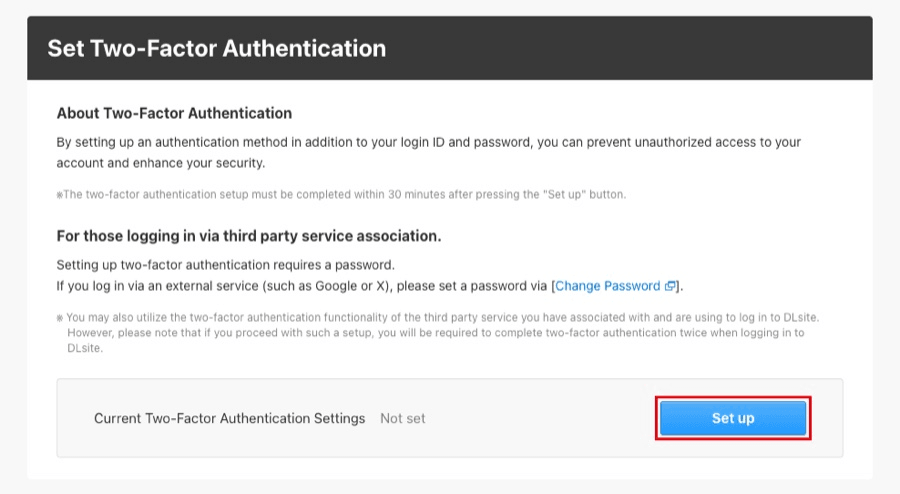
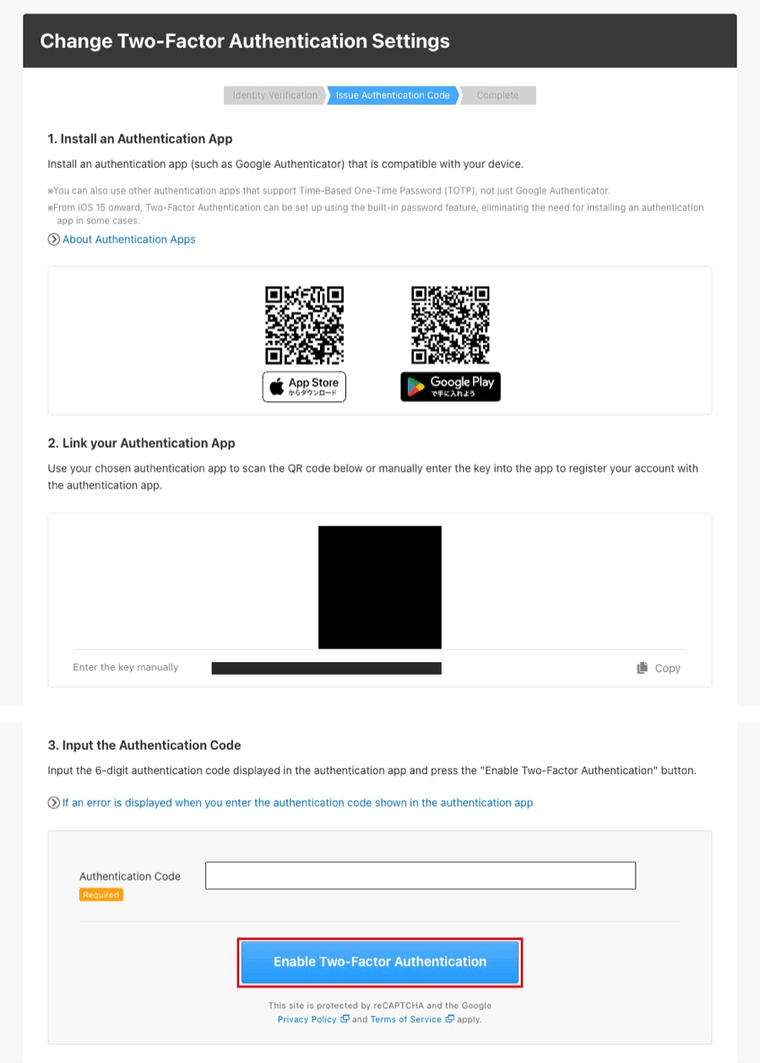
Two notes from DLsite’s setup screens:
- Social login users must first set a password from “Change Password” in Account Management.
- If your social account also has its own 2FA, DLsite warns you will “complete two-factor authentication twice when logging in.”
Where to find Account Management (PC):
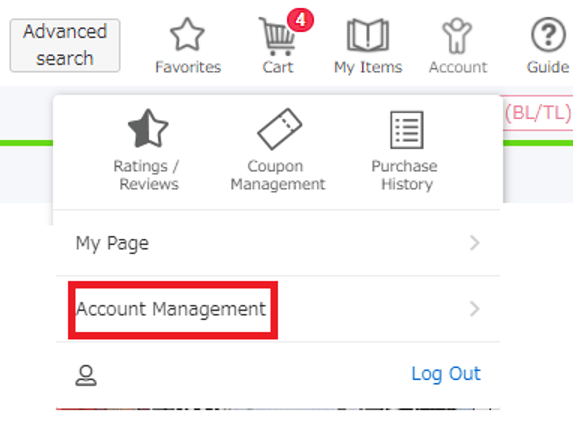
The authentication code is rejected
When a correct-looking 2FA code fails
Use the newest code
The code changes every 30 seconds. Enter the latest one before it changes. The app shows codes even offline.
Set your phone's date and time to automatic
If your device clock is out of sync, correct codes fail. This can happen on both Android and iPhone.
Restart the phone
If automatic time is already on, DLsite suggests restarting the device so the time syncs.
Wait if you are locked
Too many wrong codes lock the account temporarily. Wait before trying again.
Source: DLsite Help: error entering the authentication code.
Lost your phone or deleted the authenticator app?
If you uninstalled the app, or changed or lost the phone and can no longer log in, DLsite sends you to the form at login.dlsite.com/two-factor/forgot. The English help calls it an “Inquiry Form” to customer support. The Japanese help calls it the procedure for resetting two-factor authentication.
Backup codes: DLsite’s English and Japanese help centers and the viviON ID help do not mention backup or recovery codes for 2FA (checked November 14, 2026). Do not count on having any. The reset form is the official route.
Sources: DLsite Help: uninstalled the app (Japanese), DLsite Help: changed or lost the device (Japanese).
Before you change phones
DLsite asks you to disable two-factor authentication, or complete “Reset Two-Factor Authentication,” before deleting the authenticator app or switching phones. Doing it first saves you from being locked out.
How to turn 2FA off
- Log in and open Account → Account Management (on a phone: ≡ → Settings → “Manage Your Account” → Account Management).
- Press “Set up Two-Factor Authentication,” then “Disable.”
- Enter your DLsite password and press “Proceed to Input Authentication Code.”
- Enter the code from your app and press “Disable Two-Factor Authentication.”
DLsite warns that turning it off lets you log in with your password alone, which weakens your account’s security. Source: DLsite Help: disabling 2FA.
Is the “Please Strengthen Your Security” email real?
Yes. Since November 10, 2026, viviON has been emailing everyone with a viviON ID under the subject “[Important] Please Strengthen Your Security (About Setting Up Two-Factor Authentication).” DLsite says:
- It comes from info (at) vivionid.com or mg (at) dlsite.com, but sender names can be spoofed, so open the setup page yourself instead of clicking the link.
- “We will never ask for your password by email or through an inquiry.”
- 2FA is recommended, with no deadline.
- Your viviON ID may still exist even if you left individual services.
Source: DLsite Help: official viviON email.
Keep an eye on your account after you get back in
- Login History (Account Management → “Confirm Login History”) shows the time, device, and IP address of each login.
- Login notifications email you when you log in from a new device or browser. Private tabs or some cookie settings can trigger them every day.
- If you see a login you don’t recognize, change your password right away, then check your account information.
- Use a password of at least 8 characters with mixed case, numbers, and symbols, and don’t reuse it on other sites.
Sources: DLsite Help: preventing unauthorized access, DLsite Help: login history, DLsite Help: login notifications.
More on card statements, emails, and privacy: Is DLsite safe?
Open DLsite in English and log in from the top page
FAQ
Q Is my DLsite login ID my email address?
Not always. DLsite lets you set a login ID other than your email, and accounts created up to October 2017 used a custom alphanumeric ID. The password reset email (or the page its link opens) shows your login ID.
Q Why does DLsite keep saying "Login failed"?
DLsite says your session may have timed out or your cache and cookies may be broken. Go back to the DLsite top page, clear cache and cookies, restart the browser, and don’t open the login page from a bookmark.
Q Does DLsite have backup codes for two-factor authentication?
DLsite’s help center does not mention any (checked November 14, 2026). If you lose the phone or delete the app, use the Reset Two-Factor Authentication form at login.dlsite.com/two-factor/forgot.
Q Can I get DLsite 2FA codes by text message?
No. DLsite uses an authenticator app such as Google Authenticator (or the iOS Passwords feature on iOS 15 and later). DLsite says this works overseas because it needs neither an internet connection nor text messages.
Q I can't use my old email address anymore. How do I get back in?
DLsite says the normal steps won’t help. Send your details through DLsite’s inquiry form (cs.dlsite.com/hc/en-us/requests/new). DLsite checks your registration and replies by email. Never include your password.
Q Does DLsite block logins from VPNs or certain countries?
We found nothing about this in DLsite’s official help (checked November 14, 2026), so we can’t confirm it either way. If logins fail only when you use a VPN, ask DLsite support.
Summary
Start with the error message. “Incorrect” means checking your login ID type and typing, then resetting your password. “Login failed” or a looping page means returning to the DLsite top page and clearing cache and cookies. For two-factor authentication, use the newest code and automatic phone time. If the phone or app is gone, use the Reset Two-Factor Authentication form, since DLsite does not mention backup codes. Once you’re back in, check your Purchase History, and see how to download your purchases if you need them again.
Sources (checked November 14, 2026)
- DLsite Help: The error message “Login ID/password combination you entered is incorrect.” appears and the Japanese version
- DLsite Help: The error message “Login failed” appears and the Japanese version
- DLsite Help: I cannot proceed beyond the login page or enter the adult-only pages
- DLsite Help: I have forgotten my Login ID and/or password and the Japanese version
- DLsite Help (Japanese): The link in the password reset email shows an error
- DLsite Help: Not receiving emails from DLsite
- DLsite Help: Logging in and Out
- DLsite Help: My Purchase History disappeared and My purchases don’t display on DLsite Play
- DLsite Help: How to delete cookies and clearing cached files
- DLsite Help: What is Two-Factor Authentication?
- DLsite Help: I want to set up Two-Factor Authentication
- DLsite Help: About Two-Factor Authentication Apps
- DLsite Help: An error occurred when entering the Authentication Code
- DLsite Help: I uninstalled the authentication app and I changed or lost the device
- DLsite Help: I want to disable Two-Factor Authentication
- DLsite Help: Regarding official emails sent by viviON
- DLsite Help: Preventing unauthorized access, login history, login notifications
- viviON ID Help: I forgot my Login ID / Password, Login ID and/or Password errors, session expired, account could not be found, login authentication failing, third-party logins
More DLsite guides
- DLsite English Works on Sale Now (November 2026): 5 Discounted Games and ASMR Compared by Discount, End Date, and Price
- How to Pay on DLsite from the US (2026): Cards, viviON Points, and What to Do When Your Card Is Declined
- DLsite Purchase Missing? Find Your Works, Fix Purchase History and PlayDRM Errors (2026)
- DLsite Reward Points Not Received? Why Bonus Points Don't Show Up, and What to Check (2026)
- How to Use DLsite on Your Phone (iPhone and Android): Buy, Stream, Listen, and Play (2026)
- Are DLsite Point Codes From Unofficial Sellers Safe? The Official Seller List and the Suspension Risk (2026)
- DLsite vs Johren vs Nutaku: Where to Buy English Adult (18+) Games (2026)
- DLsite Weekly Picks (Nov 13–19, 2026): 5 English-Ready Works Trending This Week
- DLsite Gift Cards (2026): Where to Get viviON Point Codes Safely, and Whether You Can Gift Them
- How to Pay on DLsite from Hong Kong (2026): WeChat Pay HK, Cards via DPay, and JCB
- How to Pay on DLsite from Brazil (2026): PIX, PicPay, Mercado Pago, and Boleto
- How to Pay on DLsite from Chile, Colombia, and Peru (2026): Webpay, PSE, Nequi, PagoEfectivo
- How to Pay on DLsite from Europe and the UK (2026): Use DPay While WaffoPlay Cards Are Paused
- How to Pay on DLsite from Indonesia (2026): QRIS, DANA, OVO, and ShopeePay
- How to Pay on DLsite from Mexico (2026): OXXO, SPEI, Mercado Pago, and CARNET
- How to Pay on DLsite from Thailand (2026): PromptPay, TrueMoney, and ShopeePay
- How to Pay on DLsite from Malaysia (2026): Touch 'n Go, FPX, GrabPay, and Cards
- How to Pay on DLsite from the Philippines (2026): GCash, Maya, GrabPay, and Cards
- Can You Use PayPal on DLsite? No, Here's What Works Instead (2026)
- AI-Generated Works on DLsite: Labels, the AI Section, and How to Hide Them
- DLsite vs Steam: Where Should You Buy Japanese Indie (Doujin) Games? (2026)
- 7 DLsite Sleep ASMR Works You Can Enjoy in English (3 Are Free)
- 4 Popular DLsite ASMR and Voice Works With English Versions
- DLsite Card Declined? Official Fixes for Payment Errors Outside Japan (2026)
- Where to Buy viviON Points: DPay vs WaffoPlay vs For Books (2026)
- English-Ready DLsite Games: What's Popular and How to Choose (2026)
- DLsite Coupons and Sales (2026): Black Friday Sale Nov 20-26, How Coupons Work, and Bulk Buys
- How to Download DLsite Purchases (and Re-download Them Later): DLsite Play, Nest, Split Files, and Fixes
- Getting Started on DLsite (2026): Create an Account, Set Your Currency, and Grab the First Coupons
- Fix Garbled Text in DLsite Games on a Non-Japanese PC: System Locale, DLsite Nest, and AI Patches
- Is DLsite Safe? Card Statements, Emails, Purchase History, and Account Security (2026)
- Buying DLsite ASMR and Voice Works Without Speaking Japanese: Apps, Subtitles, and Hi-Res
- Using DLsite in English: How to Switch Language and Find Translated Works
- How to Pay on DLsite from Outside Japan (2026): Cards, viviON Points, and What Actually Works
- How to Buy viviON Points (DLsite Points) in 2026: 3 Steps, DPay, and Expiry
- DLsite Refund Policy and Common Problems for International Buyers