How to Pay on DLsite from Thailand (2026): PromptPay, TrueMoney, and ShopeePay
Paying for DLsite from Thailand? Buy viviON Points on WaffoPlay's Thailand page with PromptPay QR, TrueMoney, or ShopeePay, then enter the serial code on DLsite. Card users: use DPay (WaffoPlay's card, Google Pay, and Apple Pay were temporarily unavailable on November 4, 2026).
Affiliate disclosure
This article contains affiliate links to DLsite. Details are accurate as of the update date above; check the official site for the latest information.
Quick answer
- DLsite's checkout lists only JCB cards, so most buyers in Thailand pay with viviON Points (1 point = 1 yen).
- WaffoPlay's Thailand page accepted PromptPay QR, TrueMoney, and ShopeePay on November 4, 2026. Card payment, Google Pay, and Apple Pay were shown as temporarily unavailable. Packs start at 500 points for ¥500.
- PromptPay QR can be paid from a Thai bank app, so you do not need a credit card.
- DPay's global store takes Visa, Mastercard, JCB, UnionPay, Amex, Apple Pay, and Google Pay, adds points automatically, and asks for your DLsite ID and password.
- Buy only from DLsite's official sellers. Codes from anywhere else can get your account suspended.
This week's picks · Updated every FridayDLsite Weekly Picks (Nov 13–19, 2026): 5 English-Ready Works Trending This Week
If you’re in Thailand, the simplest way to pay on DLsite is to buy viviON Points on WaffoPlay’s Thailand page with PromptPay QR, TrueMoney, or ShopeePay. You get a serial code by email and enter it on DLsite. If you want to pay by card, use DPay’s global store, which adds points to your account automatically. WaffoPlay’s own card, Google Pay, and Apple Pay options were “temporarily unavailable” on November 4, 2026.
Everything below was checked on the sellers’ and DLsite’s own pages on November 4, 2026.
Why you pay with points, not a card
DLsite’s checkout currently lists only JCB cards. Its payment guide says:
“Payment from non-Japanese credit cards may not complete successfully in some cases. For international users, it may be easier to pay via purchased points.” — DLsite: About Payment Methods
viviON Points are DLsite’s prepaid balance. 1 point = 1 yen. You buy them from an official seller, then pay for works with them.
DLsite’s [Purchase Points] page (My Page) has a section called “How to pay from outside of Japan.” It has no option labelled for Thailand. Its “Global payment methods” option opens WaffoPlay’s global page, and from there you switch the region to ไทย (Thailand) with the menu at the top right. You can also open WaffoPlay’s Thailand page directly.
Thailand options compared
| WaffoPlay (Thailand) | DPay (global) | |
|---|---|---|
| Payment | PromptPay QR, TrueMoney, ShopeePay | Visa, Mastercard, JCB, UnionPay, Amex, Apple Pay, Google Pay |
| Price shown in | Yen (¥) | USD for reference, charged in TWD |
| Smallest pack | 500 points (¥500) | 1,000 points (≈ $6.59) |
| How points arrive | Serial code by email | Added to your account automatically |
| Asks for your DLsite password? | No | Yes |
| Status on Nov 4, 2026 | Open (PromptPay and e-wallets only) | Open |
Sources: WaffoPlay Thailand, DPay store.
WaffoPlay Thailand: PromptPay, TrueMoney, ShopeePay
This is the best fit for most people in Thailand. You don’t need a credit card, and you never type your DLsite password on another site.
Prices on WaffoPlay’s Thailand page are shown in yen:
| Points | Price |
|---|---|
| 500 | ¥500 |
| 1,000 | ¥1,000 |
| 2,000 | ¥2,000 |
| 3,000 | ¥3,000 |
| 5,000 | ¥5,000 |
| 10,000 | ¥9,900 (−1%) |
| 30,000 | ¥29,400 (−2%) |
The page does not show a baht price. Your bank or wallet converts the amount, and WaffoPlay’s terms say you pay any “currency exchange fees.” Source: WaffoPlay terms.
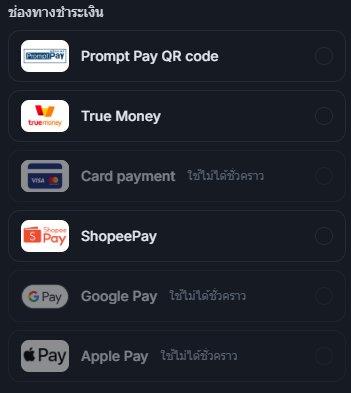
Payment methods shown: PromptPay QR code, TrueMoney, and ShopeePay could be selected. Card payment, Google Pay, and Apple Pay were greyed out and labelled “ใช้ไม่ได้ชั่วคราว” (temporarily unavailable).
No credit card? Use PromptPay
With PromptPay QR, you scan the code with your Thai bank app and pay from your account. You do not need a credit card or a foreign-currency card.
How the code arrives. WaffoPlay’s FAQ says the system “automatically” sends the serial code to your email after payment. Its notes warn that this can take a few hours. If nothing arrives within an hour, check spam, then write to WaffoPlay support with your order details.
Rules to know:
- The code is valid for 180 days from purchase. Unused codes expire and are not reissued.
- Codes are virtual goods and can’t be returned or canceled after purchase.
- You are responsible for keeping the code safe. Lost, leaked, or stolen codes are not reissued or refunded.
Check DLsite’s official payment page (English)
DPay global: card, points added automatically
DPay is the option DLsite marks “Recommended” for buyers outside Japan. Use it if you want to pay with a Visa or Mastercard credit or debit card, since WaffoPlay’s card option is unavailable for now.
From DPay’s store page, checked November 4, 2026:
- Packs: 1,000 points (≈ $6.59), 3,000 (≈ $19.77), 5,000 (≈ $32.94), 10,000 → 10,200 points (≈ $65.89), 30,000 → 31,000 points (≈ $197.66), and 50,000 → 53,000 points (≈ $329.43).
- “Payment will be settled in TWD. USD price is only for reference.” Your bank converts the amount and may add a foreign transaction fee.
- DPay “does not provide point serial numbers.” Points are added to your DLsite account after payment.
One thing to know: DPay’s checkout asks for your DLsite Account ID and DLsite Password. It says “The password is used for account verification only.” DPay is on DLsite’s official list. Still, if you’d rather not type your password elsewhere, use WaffoPlay with PromptPay or an e-wallet. Source: DPay checkout.
How to redeem a WaffoPlay code on DLsite
Buying and redeeming points from Thailand
Open WaffoPlay and switch to Thailand
Log in to DLsite, go to My Page → [Purchase Points], and choose the global payment methods option (WaffoPlay). Switch the region to ไทย (Thailand) at the top right, or open dlsite.waffoplay.com/th.
Pick a pack and pay
Choose a pack (from 500 points), enter your email, and pay with PromptPay QR, TrueMoney, or ShopeePay.
Copy the 16-character code from your email
Check your spam folder if you don't see it.
Enter the code on DLsite
Use My Page → Input Serial Code for viviON Points (not the BitCash or WebMoney pages). Paste the code exactly; it's case-sensitive.
Check your balance, then pay with points
Your balance shows at the top right of DLsite. At checkout, choose to use your points.
Open DLsite’s Purchase Points page (sign-in required)
If the code shows an error right after you buy it, DLsite’s help suggests waiting a little and trying again, or using another browser or device. Source: DLsite Help.
Stay safe: official sellers only
DLsite’s help center says its list contains “the only places to legitimately buy viviON points.” If you use a code from anywhere else, “your account will be suspended upon discovery.” Source: DLsite Help.
The list: For Books, Point Market, Dianshu.jp, DLpay Taiwan, DLpay Crypto, DPay, WaffoPlay, and PtPtPoints.
- Skip codes sold on marketplaces, Discord servers, or by resellers, even if they are cheaper.
- Use a DLsite password you don’t use anywhere else, as DLsite’s help recommends.
More on safety: Is DLsite safe?
What to buy first
Once the points are in your account, works on sale cost fewer points, and new accounts get coupons for the first order. Most popular English-ready works are games and voice works:
Check the language on the product page before you buy: a translated version is usually a separate product from the Japanese original.
Browse English-ready games on DLsite
FAQ
Q Can I pay for DLsite with PromptPay or TrueMoney?
Not at DLsite’s checkout. Buy viviON Points on WaffoPlay’s Thailand page with PromptPay QR or TrueMoney, then enter the serial code on DLsite. ShopeePay works the same way.
Q Can I use Rabbit LINE Pay?
It was not listed on WaffoPlay’s Thailand page on November 4, 2026. Use PromptPay QR from your bank app, TrueMoney, or ShopeePay.
Q Are prices shown in baht?
No. WaffoPlay’s Thailand page shows prices in yen (for example, ¥1,000 for 1,000 points), and DPay charges in Taiwan dollars. Your wallet or bank converts the amount.
Q Is WaffoPlay safe to use from Thailand?
WaffoPlay is on DLsite’s official list of point sellers. Open it from My Page → [Purchase Points] so you know you’re on the real site.
Q How long do points last?
A WaffoPlay code must be entered within 180 days of purchase. After that, points expire one year after you last earn or use points.
Summary
From Thailand, pay on DLsite with viviON Points. WaffoPlay’s Thailand page is the easiest: PromptPay QR, TrueMoney, or ShopeePay, from ¥500, with a serial code by email. To pay by card, use DPay global; it adds points automatically but asks for your DLsite password.
Related guides:
More DLsite guides
- DLsite English Works on Sale Now (November 2026): 5 Discounted Games and ASMR Compared by Discount, End Date, and Price
- Can't Log In to DLsite? Fixes for Login Errors and Two-Factor Authentication (2026)
- How to Pay on DLsite from the US (2026): Cards, viviON Points, and What to Do When Your Card Is Declined
- DLsite Purchase Missing? Find Your Works, Fix Purchase History and PlayDRM Errors (2026)
- DLsite Reward Points Not Received? Why Bonus Points Don't Show Up, and What to Check (2026)
- How to Use DLsite on Your Phone (iPhone and Android): Buy, Stream, Listen, and Play (2026)
- Are DLsite Point Codes From Unofficial Sellers Safe? The Official Seller List and the Suspension Risk (2026)
- DLsite vs Johren vs Nutaku: Where to Buy English Adult (18+) Games (2026)
- DLsite Weekly Picks (Nov 13–19, 2026): 5 English-Ready Works Trending This Week
- DLsite Gift Cards (2026): Where to Get viviON Point Codes Safely, and Whether You Can Gift Them
- How to Pay on DLsite from Hong Kong (2026): WeChat Pay HK, Cards via DPay, and JCB
- How to Pay on DLsite from Brazil (2026): PIX, PicPay, Mercado Pago, and Boleto
- How to Pay on DLsite from Chile, Colombia, and Peru (2026): Webpay, PSE, Nequi, PagoEfectivo
- How to Pay on DLsite from Europe and the UK (2026): Use DPay While WaffoPlay Cards Are Paused
- How to Pay on DLsite from Indonesia (2026): QRIS, DANA, OVO, and ShopeePay
- How to Pay on DLsite from Mexico (2026): OXXO, SPEI, Mercado Pago, and CARNET
- How to Pay on DLsite from Malaysia (2026): Touch 'n Go, FPX, GrabPay, and Cards
- How to Pay on DLsite from the Philippines (2026): GCash, Maya, GrabPay, and Cards
- Can You Use PayPal on DLsite? No, Here's What Works Instead (2026)
- AI-Generated Works on DLsite: Labels, the AI Section, and How to Hide Them
- DLsite vs Steam: Where Should You Buy Japanese Indie (Doujin) Games? (2026)
- 7 DLsite Sleep ASMR Works You Can Enjoy in English (3 Are Free)
- 4 Popular DLsite ASMR and Voice Works With English Versions
- DLsite Card Declined? Official Fixes for Payment Errors Outside Japan (2026)
- Where to Buy viviON Points: DPay vs WaffoPlay vs For Books (2026)
- English-Ready DLsite Games: What's Popular and How to Choose (2026)
- DLsite Coupons and Sales (2026): Black Friday Sale Nov 20-26, How Coupons Work, and Bulk Buys
- How to Download DLsite Purchases (and Re-download Them Later): DLsite Play, Nest, Split Files, and Fixes
- Getting Started on DLsite (2026): Create an Account, Set Your Currency, and Grab the First Coupons
- Fix Garbled Text in DLsite Games on a Non-Japanese PC: System Locale, DLsite Nest, and AI Patches
- Is DLsite Safe? Card Statements, Emails, Purchase History, and Account Security (2026)
- Buying DLsite ASMR and Voice Works Without Speaking Japanese: Apps, Subtitles, and Hi-Res
- Using DLsite in English: How to Switch Language and Find Translated Works
- How to Pay on DLsite from Outside Japan (2026): Cards, viviON Points, and What Actually Works
- How to Buy viviON Points (DLsite Points) in 2026: 3 Steps, DPay, and Expiry
- DLsite Refund Policy and Common Problems for International Buyers